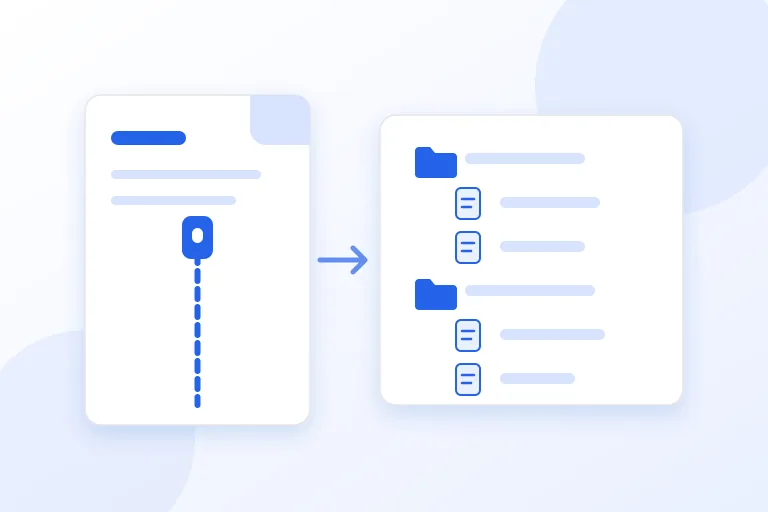
A Word document looks like one thing: a file with a name and an icon. Inside, it is a folder of small files that have been packed into a ZIP archive. Rename a .docx to .zip, open it, and you can see them: the text, the styles, the headers and footers, the pictures, and the details about who wrote the document. The same is true of Excel workbooks and PowerPoint presentations.
This guide explains how these files are put together, what the main parts hold for each of the three programs, and why it is useful to know. It draws on the Library of Congress description of the Office Open XML format, on Microsoft's documentation of how Word, Excel, and PowerPoint files are structured, and on the ECMA-376 standard, all linked at the end. It also uses the tests that were run for the Office file repair pages on this site, where damaged samples were rebuilt from their parts.
The short answer: the file is a ZIP package of XML parts that are tied together by two kinds of index files, and a problem in the package, in one part, or in an index can make the whole file refuse to open even when the text inside is fine.
A package, not a single file
The Library of Congress describes the Office Open XML family, which covers .docx, .xlsx, and .pptx, as a format whose files are packaged with the Open Packaging Conventions, a container format based on ZIP. The standard has two numbers, ECMA-376 and ISO/IEC 29500, and the Library of Congress records that it was approved by Ecma in December 2006 and by ISO in early 2008. The file extensions are not part of the ISO standard, but .docx, .xlsx, and .pptx are the ones that Microsoft Office uses.
A ZIP archive is a list of files, each one usually compressed, with an index at the end that says where each file starts. The Open Packaging Conventions add rules on top: which files must exist, how they are named, and how they point at each other. The result is that an Office file is both an ordinary ZIP file, which any ZIP program opens, and a package that has to follow the rules to be accepted by Office.
How to look inside
Microsoft's documentation gives the method. To view the package, rename the extension on the document from .docx to .zip, and open it with a ZIP program or with the built-in ZIP support of your system. The same works for .xlsx and .pptx. Do this on a copy, not on the original, and delete the copy afterwards, because a changed file can stop opening.
You will see a small number of top-level items. A folder called _rels, a folder called docProps, a folder named after the program, which is word, xl, or ppt, and a file called [Content_Types].xml. Open any XML part in a text editor and you see tags, text, and attributes. It is readable but not made to be written by hand, and one wrong character can break a part.
The two files that hold the package together
Two kinds of small file do the indexing. The file [Content_Types].xml is required in a package, and it lists the type of each part, so that Office knows that one part is a style sheet and another is a picture. If a type is missing, the part cannot be understood.
The relationship files, which end in .rels, list the links between parts. The one in the _rels folder at the top says which part is the main document. A second one that sits beside the main part says which part holds its styles, its settings, its headers, and its pictures, and gives each link an identifier. The text of the document uses those identifiers, so that a paragraph can say that it contains the picture with the identifier rId4, and the relationship file says which file that is.
This is why a file with every paragraph intact can still be refused. If a relationship points at a part that is not there, or the content types do not list a part, Office rejects the package, even though nothing was wrong with the words.
Inside a Word file
Microsoft's page on the structure of a WordprocessingML document lists the main parts: the main document, comments, document settings, endnotes, footers, footnotes, a glossary document, headers, and style definitions. The text is in document.xml in the word folder, whose root element is document and which holds a body element. The body holds paragraphs, and each paragraph holds runs of text.
A short document is therefore small. The words are plain text in the XML, each run wrapped in a few tags, and every other thing sits in a part of its own. Formatting that is used many times, such as a heading style, is defined once in the style part and used by name. Pictures are stored as files in a media folder and referred to through the relationship file. Headers and footers are separate parts, and so are comments.
- word/document.xml: the main text, in paragraphs and runs.
- word/styles.xml: the definitions of the styles that the text uses.
- word/comments.xml: the comments, with the name of the person who wrote each one.
- word/header and footer parts: the repeated text at the top and bottom of pages.
- word/media: the pictures that the document contains.
- docProps/core.xml and app.xml: the author, the dates, and the program that made the file.
Inside an Excel file
Microsoft's page on SpreadsheetML explains that the workbook part contains sheet elements that reference the worksheets, and that a separate XML file is created for each worksheet. The worksheet holds a sheetData element with the rows and cells. A cell that holds text usually does not hold the text itself. It holds the number of an entry in a table of shared strings, in which each unique text appears once, which keeps a big sheet small.
In files that Excel saves, the shared strings are normally in xl/sharedStrings.xml and the formats and fonts in xl/styles.xml. A formula is stored as text in the cell next to its last calculated value. Charts, drawings, and pivot tables are parts of their own, and a pivot table keeps a copy of the data that it summarises.
The consequence is that the cells and their texts are in different parts. If the shared strings part is damaged, the cells that point into it show nothing or the wrong words, and a repair has to rebuild the table or drop the cells that refer to it.
Inside a PowerPoint file
Microsoft's page on PresentationML says that the main part starts with a presentation element, that it contains slide elements that reference the slides, and that a separate XML file is created for each slide. Alongside the slides there are slide masters, slide layouts, and a theme, which together decide how a slide looks. Speaker notes are in notes slides, comments are parts of their own, and pictures and media are stored as files.
A slide points to a layout, a layout points to a master, and the master points to a theme. That chain is the reason why a slide that has lost its layout cannot be opened as it is. A repair has to find another layout for it or leave the slide out.
Why a file is so much smaller than its parts
Each part in the ZIP archive is compressed, usually with the DEFLATE method that RFC 1951 describes. XML is very repetitive, with the same tags again and again, so it compresses well, and a document of many pages can be a few tens of kilobytes. Pictures are already compressed in their own formats, and a document with photos is dominated by them.
This is also why a file that opens in Word can be hard to repair when it breaks. A damaged compressed stream does not just lose a few characters. Everything after the damaged point in that part can be unreadable, and an ordinary decompressor discards even the part that it did read. A repair tool needs a decoder that keeps what it decoded before the damage.
What this means for privacy
The parts that sit around the text are the reason that a document can reveal more than you wrote. The document properties name the author and the program. The comments part keeps every comment and the name of whoever wrote it. The tracked changes are in the main text with the author and the date of each one, and the deleted words are still there. Pictures carry their own hidden data. None of this appears on the page you read.
Knowing the layout makes it easier to see why the built-in tools exist and what they do. The Document Inspector in Office removes data from these parts, and a browser-based cleaner can do the same on a copy and then check the file again. Our guide on removing metadata from a Word document goes through the steps.
What this means when a file will not open
Most broken Office files are broken in one of three ways. The file ends too soon, because a download or a save was cut short, and the index at the end of the ZIP archive is lost. A part is damaged, because a byte changed or a program wrote bad XML. Or a package index is wrong, because a content type or a relationship is missing.
Each has a different fix, and knowing the structure shows what can be saved. A file that was cut off still has all the parts before the cut, and each one is preceded by a header that says what it is, so a program can find them without the index. In the tests for the repair pages on this site, 47 repaired Word files, built from four samples damaged in 55 ways, all opened in python-docx and passed a strict XML check, and the amount of text that came back grew from 3 to 17 of 18 paragraphs as the cut moved toward the end of the file. A file that is damaged before the first text has nothing to recover, and the tool says so.
If you have such a file, work on a copy, try the repair command of the program first, and keep the damaged original until you know that the result is complete.
What a .docx cannot contain
By design, a .docx file does not hold macros. Documents with macros use a different extension, such as .docm, and the macro code is stored as its own part. This is one reason that a .docx is considered safer to open than a macro-enabled file, although a .docx can still contain links, embedded objects, and pictures that you should treat with care when the file comes from someone you do not know.
Because the file is a ZIP archive, other things can be hidden in it. Any ZIP can have extra files that Office never looks at. They do not show in Word, and they travel with the file. This is another reason to clean a document before you send it outside, and to check what is in a file that you receive from an unknown sender.
Practical checklist
- Work on a copy when you rename a .docx, .xlsx, or .pptx to .zip.
- Look in the docProps folder to see what the file says about its author and dates.
- Remember that comments, tracked changes, and pictures are separate parts that travel with the file.
- If a file will not open, check whether it was cut short before you look for other causes.
- Keep the damaged original until a repaired copy has been checked.
- Clean a document before sending it, and check the result by reopening it.
- Treat a .docx with embedded objects or links from an unknown sender with care.
- Remember that the program decides what is valid, and a part that looks fine in a text editor can still be refused.
Research and references
This guide was prepared from the authoritative references below.